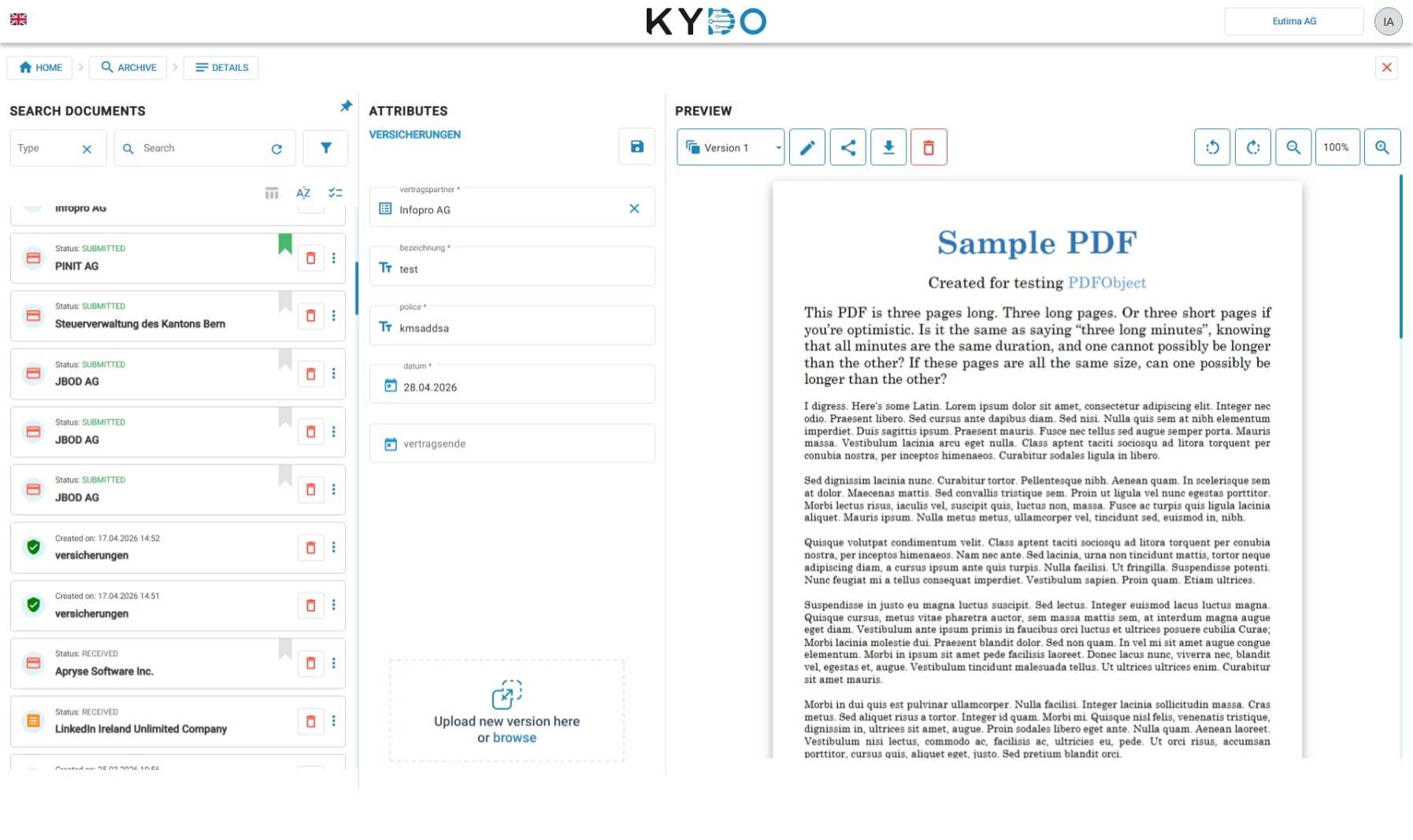
Editing attributes
The left side of the document view shows all the attributes for the document. To edit them, update the values directly in the text fields and click Save at the bottom of the attribute panel. Your changes are applied immediately.
Below the attribute panel, there is a drag and drop area — similar to the one in the Inbox. Use it to upload a new version of the document.
Document preview
The right side shows a preview of the document. If the document has multiple versions, you can switch between them using the version selector at the top of the preview.
The toolbar provides the following actions:
- Edit — open the document for editing.
- Share — generate a share link for the document.
- Download — download the current version of the file.
- Delete — delete the current version of the document. This action only removes the selected version, not the document itself.
Deleting a document
The delete button in the document view removes only the current version. To delete a document entirely — including all its versions — use the delete button in the archive list. KYDO will ask you to confirm before permanently removing the document.
Recovering a deleted document
If you deleted a document by mistake, contact us as soon as possible. We can recover documents deleted within the last two years.
To help us find it quickly, provide as much information as you can:
- Document name or filename
- Document type
- Approximate date it was filed or deleted
- Username of the user who deleted it
- Any attribute values you remember (amounts, reference numbers, supplier name, etc.)
Recovery is billed based on the time needed to locate and restore the document. Contact us to start the process.
Frequently Asked Questions
Can I recover a document I accidentally deleted? Yes, if it was deleted within the last two years. Contact us with as much detail as possible about the document — name, type, date, and any attribute values you remember. Recovery is billed based on the time required.
How long does recovery take? It depends on how much information you can provide. The more detail you give us, the faster we can locate the document.
Is there a cost for recovering a deleted document? Yes. Recovery is billed at our standard hourly rate based on the time needed to find and restore the document.