What is a doc type?
A doc type is a template that tells KYDO what information to ask for when a document is filed. Think of it as a filing label with a set of fields — every document of that type will carry the same information.
For example, a doc type called Invoice might include fields for the supplier name, the invoice date, and the invoice number. When a user receives an invoice in the inbox, KYDO will prompt them to fill in exactly those fields before the document is archived.
Creating a doc type
- From the home screen, click the Properties card.
- Click the + button.
- A configuration form appears — fill in the name and add the fields you need.
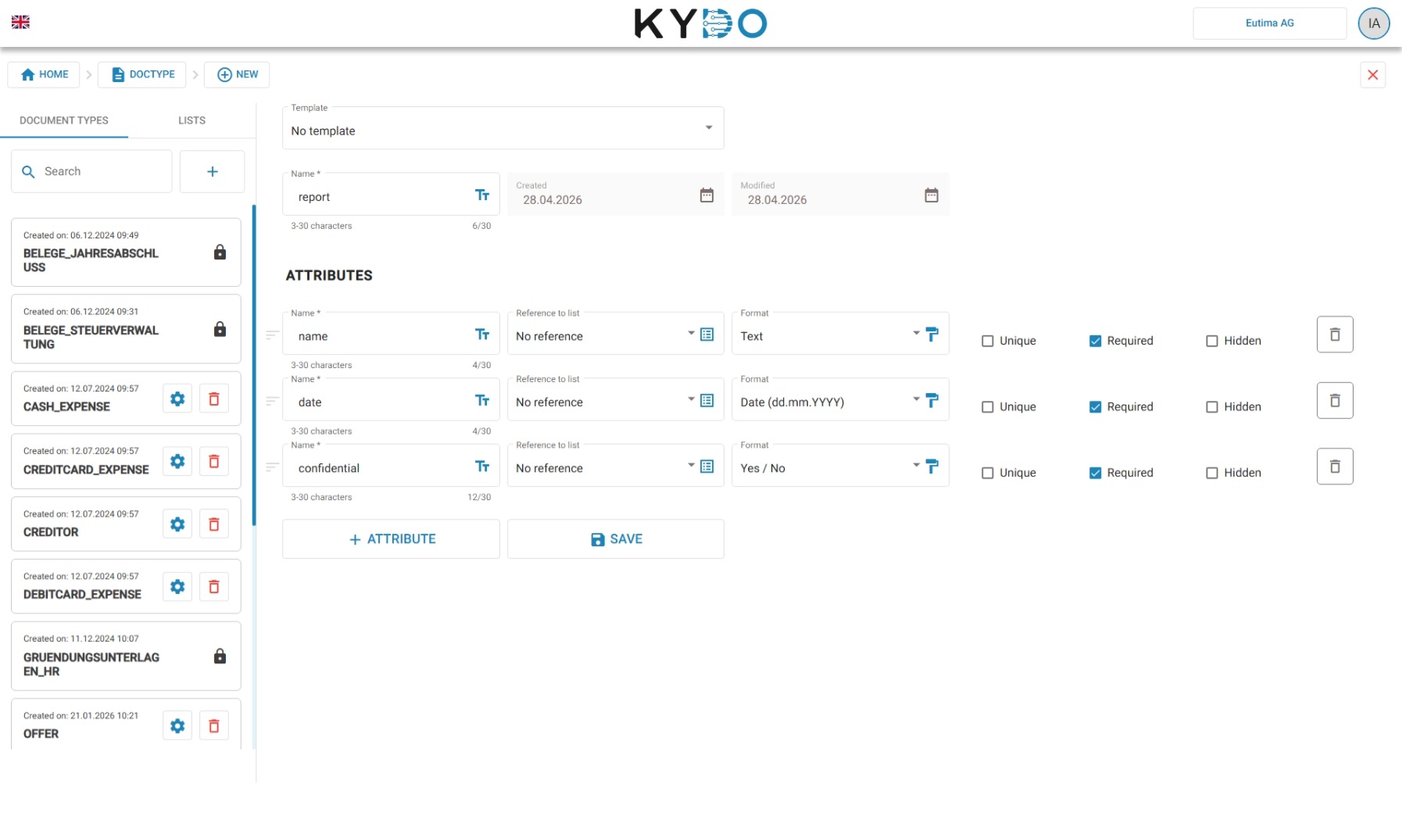
Fields and formats
Each field has a format that defines the type of value it accepts:
| Format | Use it for |
|---|---|
| Text | Any combination of letters and numbers — names, references, descriptions |
| Integer | Whole numbers without decimals — quantities, counts |
| Floating point | Numbers with decimals — amounts, measurements |
| Date | A calendar date — invoice date, expiry date |
| Date & time | A date with a specific time — timestamps, appointments |
| Time | A time of day — opening hours, deadlines |
| Boolean | A yes / no value — paid, approved, active |
| JSON | Structured data for integrations with external systems |
Field properties
Each field also has the following optional properties:
- Required — the user must fill in this field before the document can be filed.
- Unique — no two documents of this type can share the same value for this field. Useful for invoice numbers or reference codes.
- Hidden — the field is not visible to standard users. Useful for internal or administrative data.
- Reference — links the field to a predefined list. Instead of typing a value, the user selects from a searchable dropdown populated with the list's data. Set to none if no list should be used.
→ See Lists to learn how to create and populate a list.
Reseller and distributor doc types
If your KYDO environment is managed by a reseller or distributor, some doc types may already be available to you. These are defined at the reseller level and shared across all their customers. You can recognise them by the lock icon — they cannot be edited or deleted from within your tenant.
Frequently Asked Questions
What is a doc type in KYDO? A doc type defines the structure of a category of documents — which fields to collect, what format they accept, and how the document behaves in the archive. Every document filed in KYDO belongs to a doc type.
How many doc types can I create? There is no fixed limit. You can create as many doc types as your workflow requires — one per document category is the typical approach.
Can I make a field mandatory? Yes. Set the Required property on any field — users will not be able to file a document without filling it in.
What is a reference field? A reference field links to a list, showing users a searchable dropdown of predefined values instead of a free-text input. This keeps data consistent across documents.
Can I change a doc type after documents have been filed with it? You can add or modify fields at any time. Existing documents will not be affected retroactively — they keep the values they had when they were filed.
What does the lock icon on a doc type mean? It means the doc type was defined by your reseller or distributor. It cannot be edited or deleted from your tenant.